
Read aloud3 min read
Turn your words into audio
Paste a finished script, choose a voice and listen to an audio version you can download.
Use it for
- Record a community announcement
- Listen to written material
- Prepare a voiceover for a video
Inside the app Enlarge
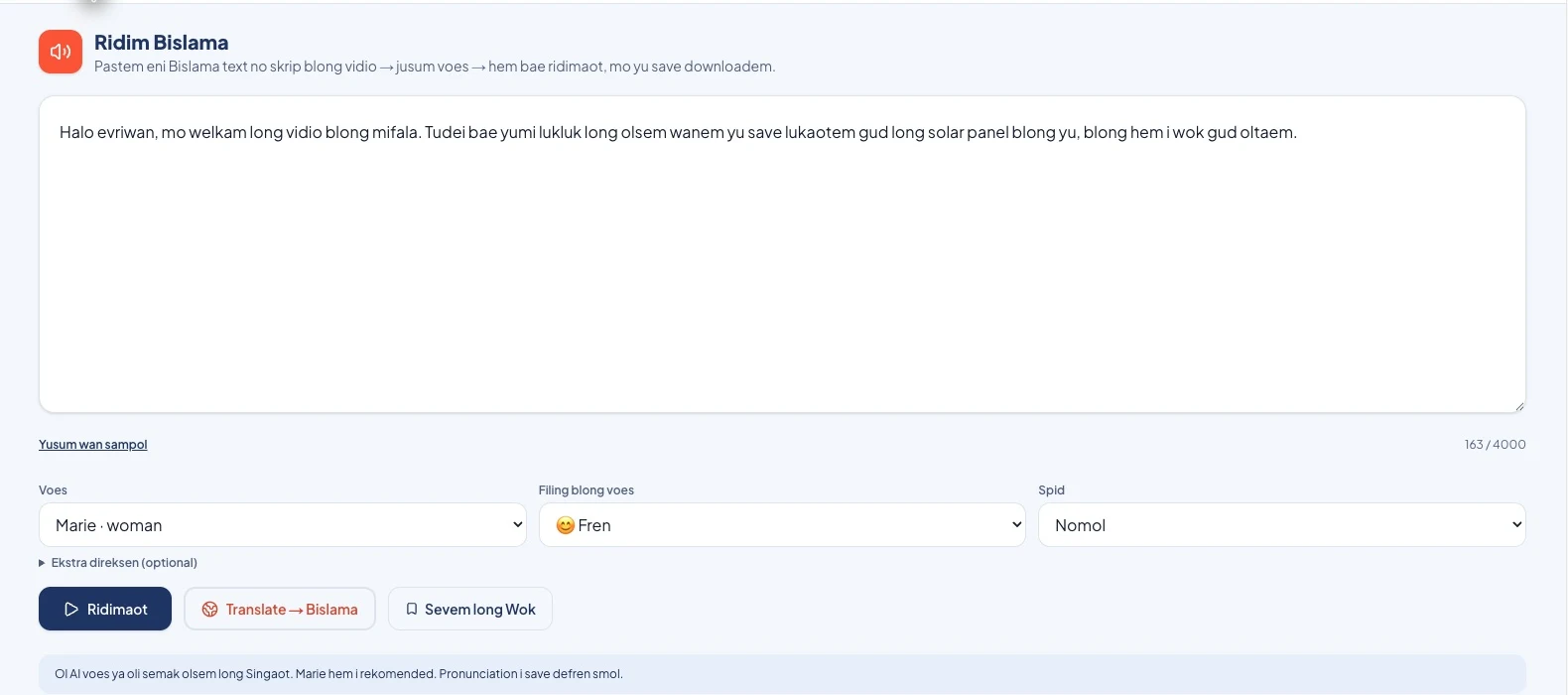
- 1Text box: paste your script
- 2Voice, emotion and pace: choose delivery
- 3Read aloud: generate and listen
How to use it
- 1
Prepare the script
Open Read aloud / Ridim and paste your Ga text. Use the sample button if you want to try the editor first. Check the character counter.
- 2
Choose the delivery
Choose an available voice and adjust emotion and pace where offered. Voice availability differs by language and product.
- 3
Generate and listen
Press Read aloud. Wait for the audio player, listen to the whole script and check names, numbers and pronunciation.
- 4
Download or save
Use the audio download control when a result is ready. Save the script to Wok / My work if you want to return to it later.
Try a request like this
“Paste a short announcement in Ga, check the wording, then choose the voice and pace.”
Adapt the names, dates and details before sending. Example requests do not run automatically.
Good to know
- Use only languages supported by your selected voice. Native voice availability varies; a text language option does not guarantee a natural spoken voice.
- Use Chat to write or refine the script before opening Ridim.
- Saving the text and downloading the audio are separate actions.
- Write names and amounts clearly, then listen before publishing your recording.